Going Online
Getting the models online actually wasn’t as difficult as I was expecting. I based most of my code on the Mobilenet example which takes an image as an input and gives a classification as output. Once a model is loaded via loadGraphModel() just calling model.predict(< input tensor >) will tell it to do it’s thing and it will give a tensor back; whatever tensor it was trained to spit out. So to rework the example into one which can generate images I just had to parse the image tensor the model gives me.
async function postProcessTF(logits){
	return tf.tidy(() => {
		const scale = tf.scalar(0.5);
		const squeezed = logits.squeeze().mul(scale).add(scale);
		const resized = tf.image.resizeBilinear(squeezed, [IMAGE_SIZE, IMAGE_SIZE]);
		return resized;
	})
}
This is exactly what happens in a Python based Tensorflow project, just in Javascript sytax. I was pleasantly surprised how simple it is to translate from Python to Javascript with Tensorflow. I get the feeling the 2.X.X versions of the Tensorflow API are a significant improvement on the 1.X.X versions.
TF has a few handy functions to convert to and from tensors, so getting image data into a tensor format is done by loading the image into a <img /> element or loading it into a HTML canvas and grabbing the data with something like:
const img = tf.browser.fromPixels(imgElement).toFloat();
So it wasn’t too long before I was generating images from a model which had been converted and was inferencing in the browser:
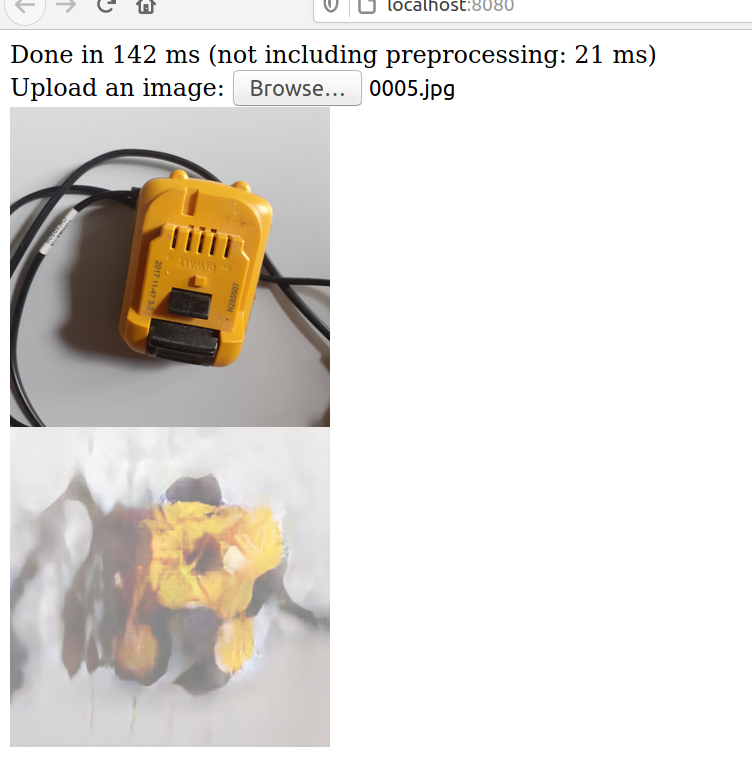

The images were coming out all washed out which took me a few days to figure out way. It was because I was doing the ol < tensor > * 0.5 + 0.5 trick twice when converting it back to an image. For a long time I thought it was just because the model had lost a lot of something in the conversion process… So a lot of the images in this post will show washed out images.
The main purpose of this particular online experiment was to make something which I could upload a model to; upload images and video and measure how long things were taking and to check the quality.
The first issue really was figuring out from which format, and to which format a model should be saved and loaded to and from and then to and into and such. Because there are many machine learning frameworks out there, and Tensorflow has gone through some changes in quite a short space of time, there are many formats you could save a model into once it has been trained. It turns out, the one for my needs is the .h5 format which saves a single .h5 file and is done in Python like so:
model.save('directory/to/save/model.h5')
Pretty straightforward. Then we need to convert it into something which Tensorflow JS can use. This is done with the Tensorflow Converter which is part of Tensorflow JS. There is a lot of writing on the Github page, but the most important bit is about running it inside a virtual environment. That is so you can have pyenv installed and then install the right version of Python  After that just running
 tensorflowjs_wizard in the command line is pretty good, it will walk you through step by step the conversion process and it’s pretty quick.
This will give you a bunch of binaries which store the weights, and a model.json file which is all the info Tensorflow needs to put all the pieces back together again. Then it was a bit of a headache which I don’t really want to go into of how to actaully let the user upload all this to the site, but it works now.
Tensorflow JS does not have as many number crunching and image manipulation tools as the Python API so I enlisted the help of OpenCV-JS to do just that. I’ve quite enjoyed using OpenCV in Javascript I must say; I always enjoy it, it’s a good library.
I wont go into it too much, but the pipeline is:
Load Image > Read Image with OpenCV > Manipulate > Put Image in HTML Canvas > Read from Canvas with TF > Inference > Display in new Cavas
Along the way I am attempting to time certain functions, find averages and collect some amount of useful data. I’ve kind of rushed this bit but that is still the plan. Here is the current version of it:
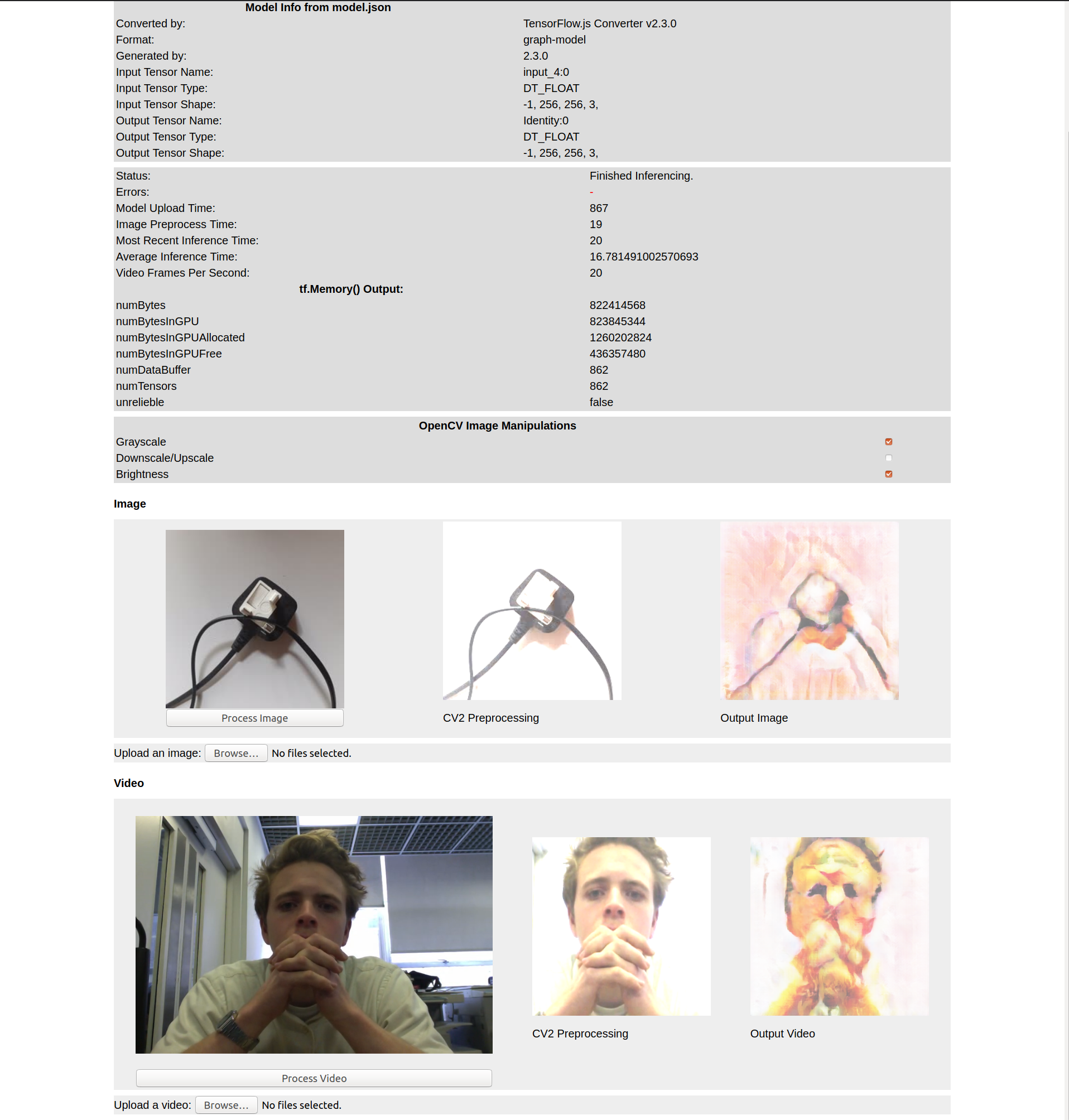
The good news is that it can play a video and inference in real-time very nicely (on the spec’d out computer I’ve borrowed from CCI). On my laptop.. not so much.
CCI GFX PC:
Incidentally this is a little spoiler of a later model, but you were gonna see it any way..
My 8 year old Macbook Pro:
Painful. At least now I have a testbed, and a benchmark.. If I can get this working even just a little bit on my old laptop I’d see that as a success. I have already tried compressing the models as much as the TF-Converter will go, and the model shrinks quite a lot, but it makes absolutely no difference on my laptop. So there’s work to be done there.
Other Things
Some other little gotchas which are worth mentioning:
- Tensorflow and OpenCV are JS frameworks which sit on top of compiled C++ frameworks which have been compiled to ASM to work online. So both are susceptible to memory leaks. With OpenCV, if you create any
Mat()s then you need todeletethem. And with TF any time you are creating tensors you need to also think about deleting them. You can be explicit and do it yourself, or wrap any tensor-manipulation routines inside areturn tf.tidy(() => {})which will delete (ordispose) any unused tensors for you. I came across this error and it did grind the website to a halt after a while. Callingtf.memory()will get all the currently used memory and gives you a really good overview of whats using what memory. I like it so much I’ve started outputing the info istf.memory()to the main page. Here you can see thenumTensorsgrowing each time I load a model (I wasn’tdispose-ing the old model).