Smaller Models
Following up on the previous post, I tried out what probably should have been my first experiment with all this, and that is to just run a smaller model. By that I mean a model with far fewer parameters. As I spoke about in the previous post, most of the parameters in the pix2pix model are centered around the middle layer of the model, so reducing the number a layers does not do much to reduce the size, but by reducing the number of filters each conv2D layer trains on can significantly reduce it’s size. As it turns out you can still get a pretty decent model out of it too! But I’ll come back to that shortly.
The initial conv2D layer in the original pix2pix model starts with 64 filters in the first layer of the generator (the encoder half), and then proceeds to double the number of filters maxing out at 512. At the middle layer the model then begins to decode and halves the number of filters down to 64 again, mirroring the encoder half. This results in 52,476,931 total parameters. We can scales those numbers down by a reasonable order of magnitude resulting in the following structure:
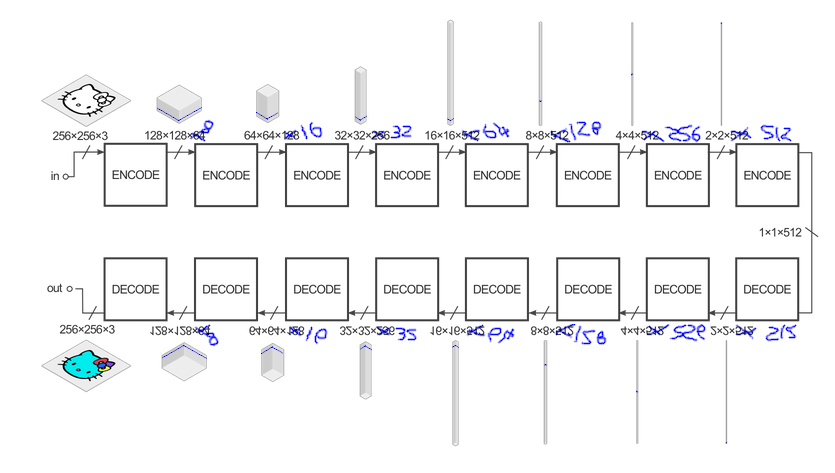
Excuse my bad mouse-handwriting and the fact I just mirrored the top half for the bottom… But you can see visually that the number of parameters is greatly reduced compared to the original. This model starts with jutst 8 filters at the first layer and then follows the same pattern as before: double each layer up to 512 filters and then halving back to 8. This results in 16,786,211 total parameters thus shrinking the model by approximately a third. This speeds the performance of the model up in the browser significantly and also shows off the benefit of the WebGL based output. The average (rough) FPS output using the TensorflowJS toPixels() method is around 20fps, while the average (rough) FPS when output via WebGL is around 28fps, sometimes reaching 35fps.
Demos
The flowers model below is trained on the 102 Category Flower Dataset provided by Oxford University which is a collection of 1000 images of 102 types of flower. The split is 4:1 with training:testing data (although there isn’t exactly much testing, it may as well all be training data), buffer size of 900 and batch size of 4.
Flowers on RTX2070 Graphics Card in Chromium ↓
Flowers on Integrated Graphics Card in Firefox ↓
What is quite cool here is that the model actually runs on an integrated graphics card, pretty much to the same performance of the full model and in older demos. Output via WebGL almost double the framerate from approx 10fps to upto 20fps.
Flowers on Integrated Graphics Card in Chromium ↓
Running the same thing in Chromium does not yield the same results, in fact shows little difference when switching to WebGL output.. Not sure why yet because Chromium was much fast that Firefox in the first demo above.
Clouds on RTX2070 Graphics Card in Firefox ↓
This model was trained on stills from this timelapse video using the frame_extractor sript from my Auto-Pix2Pix tool. This is trained on around 600 very similar images. The result is still decent, but naturally lacks variety.
And this model below is even smaller again. The first conv2D layer has 4 filters and then follows the same pattern as above. This results in 6,297,491 total parameters, so a much smaller model again but this does not result in another performance boost and does show a much weaker model.
As a first guess, I imagine this reaches the bottleneck of just running the model using TensorflowJS. The things taking the most time in this instance may well be all the WebGL API calls and just moving data around, rather than the computation itself - but that’s just a guess for now.
And here is a video of the model upload process on Chromium ↓
What Next
Now, given I have a smaller model size which performs much better in the browser and also performs well enough to get some meaningful interaction, I should probably package that up into a simpler web app which can be sent around and tested on many more machines with varying capabilities. What I often find is that something works fine on my laptop in my home, but tends to fall to bits when someone else touches it. So some actual user testing should happen soon.
But actually what I’m noticing is that TensorflowJS is providing the speed-bumps here. TensorflowJS is phenomenal I must say; the fact that it can be so multipurpose and function exceptionally well in most cases is a great achievement. But as is the case with most large libraries, there has been a sacrifice of speed for flexibility. The internal nuts and bolts use WebGL and shader programs to run the computation but it is frequently taking data out of the WebGL pipeline to do some TensorflowJS manipulation and then giving it back to WebGL which is always going to be slow. What if that process was streamlined, and made more specific to the task at hand?
Well, I’ve already spent 3 weeks of my life trying to answer that question while panicking that I’m out of my depth and I’m wasting my time. BUT! I think I actually have something (theoretically) cool which at least proves a point. TBC…